Journler – New Version
I have used Journler for awhile – as a GTD tool, (See this post from Scarfone – older, but still a great start), a project managemnt system and a blog editor. I’m a big fan of this app and it’s wonderfully responsive developer, Phil Dow.
Feature List: (from the website)
> AppleScript Support
> Filtering & Searching
> The Drop Box & JPanel
> Smart Families
> Editing Entries
> iLife Integration
> Importing
> Video Recording
> iPod Notes
> Printing and Exporting
> Tabbed Editing
> The Spoken Word
The addition of the dropbox and the JPanel features makes importing to Journler a breeze. Journler is donation-ware and has a busy forum, a wiki and a terrific help section.
Comments Off on Journler – New Version
Monthly Tools – 1) Mind-Mapping
Mind-mapping intrigues me. I’ve tried a number of ways (including the wonderful GTD Template by Dr. Pascal Venier at [Productivity Workflows]) to incorporate mind-mapping as my GTD tool of choice and have never been able to adapt to it. I guess it’s a left brian/right brain thing.
What I have been able to do is to use mind-mapping as a monthly overview tool, a brainstorming tool, and a project tool (but only for client presentation – very impressive as a tool the client can use to map all that you are doing to help them!). What helps ME is mapping (at the beginning of each month) all the projects and tasks that my teams are working on, as well as who is working on what. What I find is not only is it a great way for at-a-glance tracking tool, but that it can spur visual cues – connections – on ways I can integrate services or other products for my clients.
I start with placing the name/year in the middle of the map. Then I detail the new projects for the month at the upper-right quadrant. I include the client, project tasks and team members. I then move to the lower-right quadrant and detail the projects already in process and their status (carried over from the last month’s map). Then in the lower-left quadrant I focus on team development – specific activities that include meetings, reviews, etc. Finally in the upper-left quadrant, I put in my “Someday” list – house projects, new development, etc. (These have a 3-month cycle before I have to put them into the “New” project quadrant).
There are many free and pay mind-mapping tools. I’m using NovaMind at the moment (after I tested MindJet’s MindManager for Mac, FreeMind, NoteMind and MyMind. NovaMind has a great website with a number of templates (I’ve downloaded the project templates, the company org template and the brainstorming template) – it also reads MindManager templates.
Resources:
Novamind – Different versions to suit need/trial versions/templates
Mindjet’s MindManager – Different versions to suit need/trial versions/templates/webinars/plug-ins
MyMind – Free tool
FreeMind – Free tool
More on Mail Integration w/Actiontastic
A little more about how I work with Mail.app and Actiontastic…
Once I download my email I quickly go through and, using MailTags, quickly tag my email by Project and Keywords. I can then assign the email as a ToDo or an Event. If it’s a ToDo, I assign it to the @Inbox calendar (which syncs to iCal on the first Actiontastic sync).

After I’ve tagged each email, I use Mail Act-On to sort them quickly into folders (using rules that I’ve set up) with 2 keystrokes each.

Once finished, I sync with Actiontastic, which puts anything that’s in the @Inbox calendar into the Inbox. The URL of each message is part of the message so that it can be recalled if needed.
For more information, click this link.
My GTD System (March 2007) – Daily Process
I decided that it was time that I actually put down my current GTD system, with all of the individual tools/applications that I’m currently using (on my MacBook Pro). This includes my daily, weekly and monthly routine. I labeled this with the current month because I am always tweaking my process and looking to test and apply better tools to help me be more productive.
Collection:
My primary tool for the collection process is a 12-month Daily 2007 Moleskine diary. I had used a general lined Moleskine notebook for the last year and wasn’t sure that the Diary would have enough room. What it has done is keep me focused in what I write – I don’t use it to keep my schedule, just my notes, thoughts and actions.
Everything is then put into Actiontastic. I’ve posted about this application before, and I have really adopted it as my GTD application of choice. As soon as I get to work, I open Actiontastic and put everything into the Inbox function from my Moleskine.
I use (mostly) Actiontastic’s integration with Quicksilver to get things into the Inbox. I’ll go into how I use Quicksilver (my favorite Mac app) in a separate post, but I use the Quicksilver=>Actiontastic Inbox throughout the day.
I then open Mail.app and using Mail Act-On, MailTags and an Applescript (“toiCalInbox” set up to run as part of my Mail Act-On rules) included with the Actiontastic download. In Mail.app I also have folders set up for review (@Action, @Hold, @Respond, @Wait On, @Someday). Once I sort things into my folders, I run my “toiCalInbox” script which sends actionable email to iCal, then I hit the sync button on Actiontastic which brings it all into the Inbox. Sounds like a long process – in actuality only a few minutes.

Processing:
Once everything I need is in the Inbox – and while I do send things throughout the day, I only process first thing in the morning, after lunch and before I leave for the day (this is flexible as needed) – I hit the Process Inbox button (looks like a “Play” button). In Actiontastic I’ve set up my Projects and my Contexts (@calls, @emails, @errands, @mac, @meetings, @shopping, @waiting for, @web, @work) which also sync to iCal. Each item is processed to the appropriate Project and Context, which sets up the Next Actions and ToDos (as well as what’s Done). The new “Anti-Drawer” feature sets up the Start, Due dates (which also has a Paused flag), URL (messages, etc) and Notes.

Once I’ve processed my Inbox (again – this happens in minutes!), I hit the sync button so that everything is brought back to iCal (each context is a separate calendar). Which is great to then sync to my Blackberry 7100g (via Mark/Space’s new Missing Sync for Blackberry). I’m then free to actually work without having to really focusing on process. As each item gets done, I can tick it off and then during my Inbox processing times throughout the day everything continues to sync so that it’s all up to date.
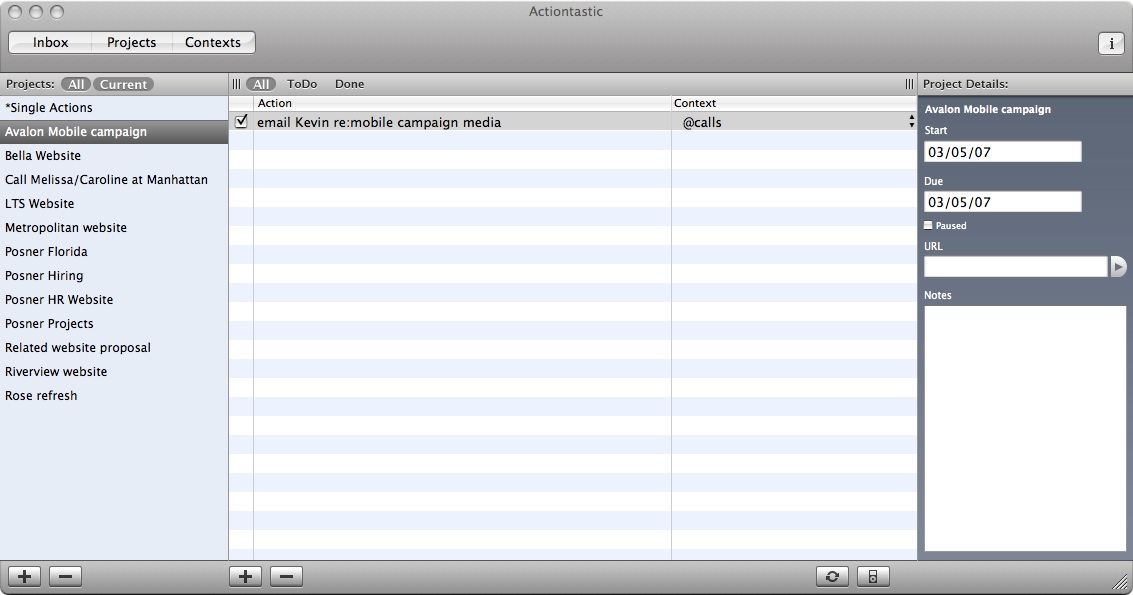
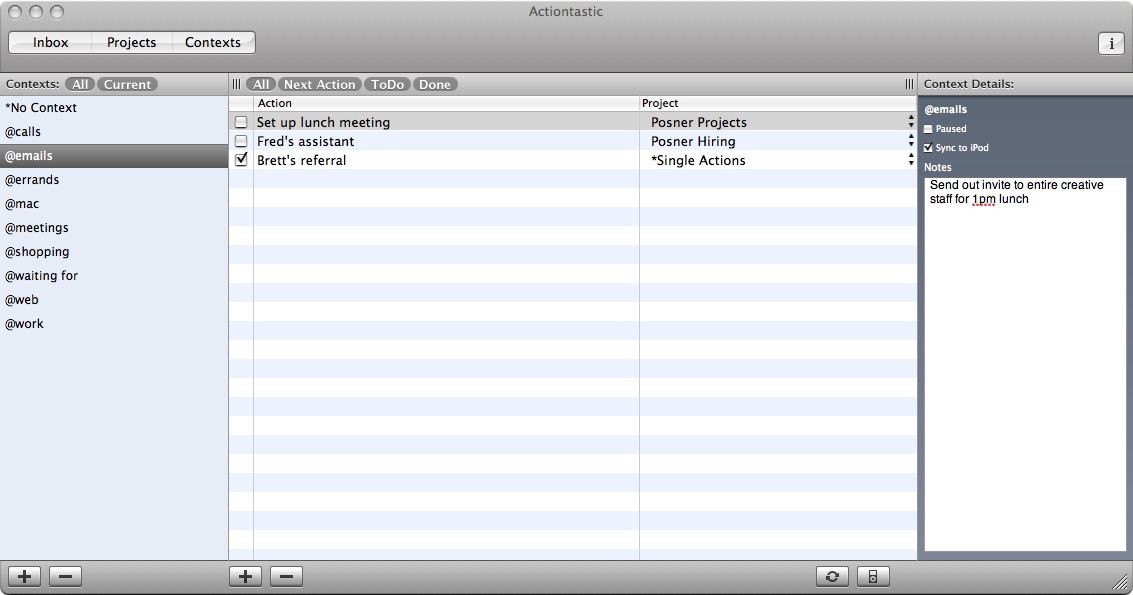
I’m adding the screenshots that I’ve posted before to illustrate the process. In my next post, I’ll focus on my weekly and monthly review process and the different applications that I use for those purposes.
Highrise – Update
One of the things that I love about 37Signals is how responsive they are to their users. “Case” in point – When Highrise launched, the Cases feature was only available on the Plus, Premium and Max plans and there was a lively discussion on the forums. Everyone wanted the Cases feature!
Today 37signals announced that all plans will include Cases:
> Plus, Premium, and Max continue to include unlimited Cases
> The new Solo plan (explained below) includes unlimited Cases
> Basic includes 5 Cases
> Personal includes 3 Cases
> Free includes 1 Case
> These numbers mean OPEN Cases – you can have other Cases that are Closed
There’s also a new plan added – the Solo Plan. It’s just like the Plus plan (which is what I’m on), except it’s for the single user – someone who doesn’t need to share their Highrise with anyone outside.
They have also increased disk space:
> Max moves up to to 50 gigs (was 20 gigs)
> Premium moves up to to 10 gigs (was 3 gigs)
> Plus moves up to 3 gigs (was 1 gig)
> Basic moves up to 500 megs (was 400 megs)
> Personal moves up to 250 megs (was 200 megs)
I’m on the perfect plan for me (and now it’s even better!) but I love that 37signals not only listened to what their early adopters were saying – but that they responded in a pretty robust manner. This is a company that enables better communication between people and have proven that they practice what they preach.
37Signals – Highrise is released!
I’ve been playing with 37Signals new Highrise application for the last 24 hours and think that it’s a great Contact Management resource (CMS). There’s a great tour that walks you through the entire application and all of it’s many features.
Since I’ve been using Basecamp (another 37Signals app) for over 2 years, many of these features are familiar to me. There’s a 30-day free trial (although you do have to give them a credit card) and I decided that I wanted to test the Plus plan ($49/month). The Plus plan includes up to 15 users, 1GB of file storage, Cases (a really interesting feature), SSl and 20,000 contacts. There are six levels in the Highrise pricing plan and I wanted to experience the whole application – especially the “cases“.
After I signed-up, I immediately imported my contacts into my account by exporting my iCal contacts as a group vCard. You can manually add contacts, upload vCards and also import from Basecamp accounts (We use Basecamp as an internal project management tool that we don’t share with clients, so that didn’t work for me!). After importing contacts, I set up my first case. What’s great about cases is that I can share them with the people directly involved with these projects. I had originally thought that “Cases” might be able to be adapted as a GTD system, but while it has some great features – Actiontastic is still my GTD app of choice. Highrise may work for some people for a GTD app, just not for me right now.
Features:
> Contacts – each contact has a page that includes a photo, contact info, tags, notes, files, tasks and more
> Tasks – Can be assigned to yourself or others. Action categories can be added (Call, Email, Etc.) and reminders can be sent by email or cell phone.
> Permissions – specify who can see whatever.
> Users and Groups – You can invite people to join your account and set the permissions for people, notes and cases.
> Cases – Keeps everything all together. Great to organize projects with its notes, tasks, files, images, people and more.
> Email friendly – Forward email to the Highrise dropbox and it will automatically be attached to the specific contacts page.
Highrise also has a FAQs and an active Forum. The 37Signals crew heavily participate in the forum on all topics – even those that may be less than a constructive critique.
Actiontastic goes Free!
One of the big GTD stories this week is the news that Actiontastic will be free (as, Jon says, “free beer”) and open source. With all of the competition in the GTD application space (like Ghost Action for one), this places Actiontastic on a different level with an entire open source community behind it.
This announcement was in start contrast to the debate over Spanning Sync’s initial pricing announcement. I’ve been testing the Spanning Sync service and have found it invaluable, and I believe that developers should be compensated. In that light, Jon’s act is unbelievably generous.
As I’ve posted, I love this app and am excited about what the development community will bring to it. A new non-expiring beta is out (0.9.3) which fixes some small bugs.
There’s a new Actiontastic FAQ – although it just might be that I missed it before.
I am hoping that Jon adds a “Donate” button soon – his work should be rewarded somehow.
Comments Off on Actiontastic goes Free!
37signals – Highrise: A New GTD app?
After reading the last Signal and Noise (37Signals) update on their new Highrise application, I’m really hoping to get a peek at it soon. It sounds like it has significant GTD applications. And I’m a big 37signals fan.
According to the new preview, Highrise will “play nice” with email – by that it means it has a “dropbox” that can be sent, bcc or forwarded emailed to. Those emails can then be attached to the pertinent page (the original sender) and notes attached so that records of all interaction (even phone calls!) can be kept. New pages can even be added on the fly if someone isn’t in your system already.
My favorite piece of this new system is the Email/Task functionality. There’s 5 different identifiers (+Today, +Tomorrow, +ThisWeek, +NextWeek, +Later) which can be appended to the dropbox (like my existing @action, @hold, @respond, etc? mailboxes). Highrise then turns this email in to a task.
37signals has begun issuing “Golden Tickets” – I’m keeping my fingers crossed that I “find” one soon.
Comments Off on 37signals – Highrise: A New GTD app?
Event Maker 0.4 – Quickly adds To Dos/Events to Calendars
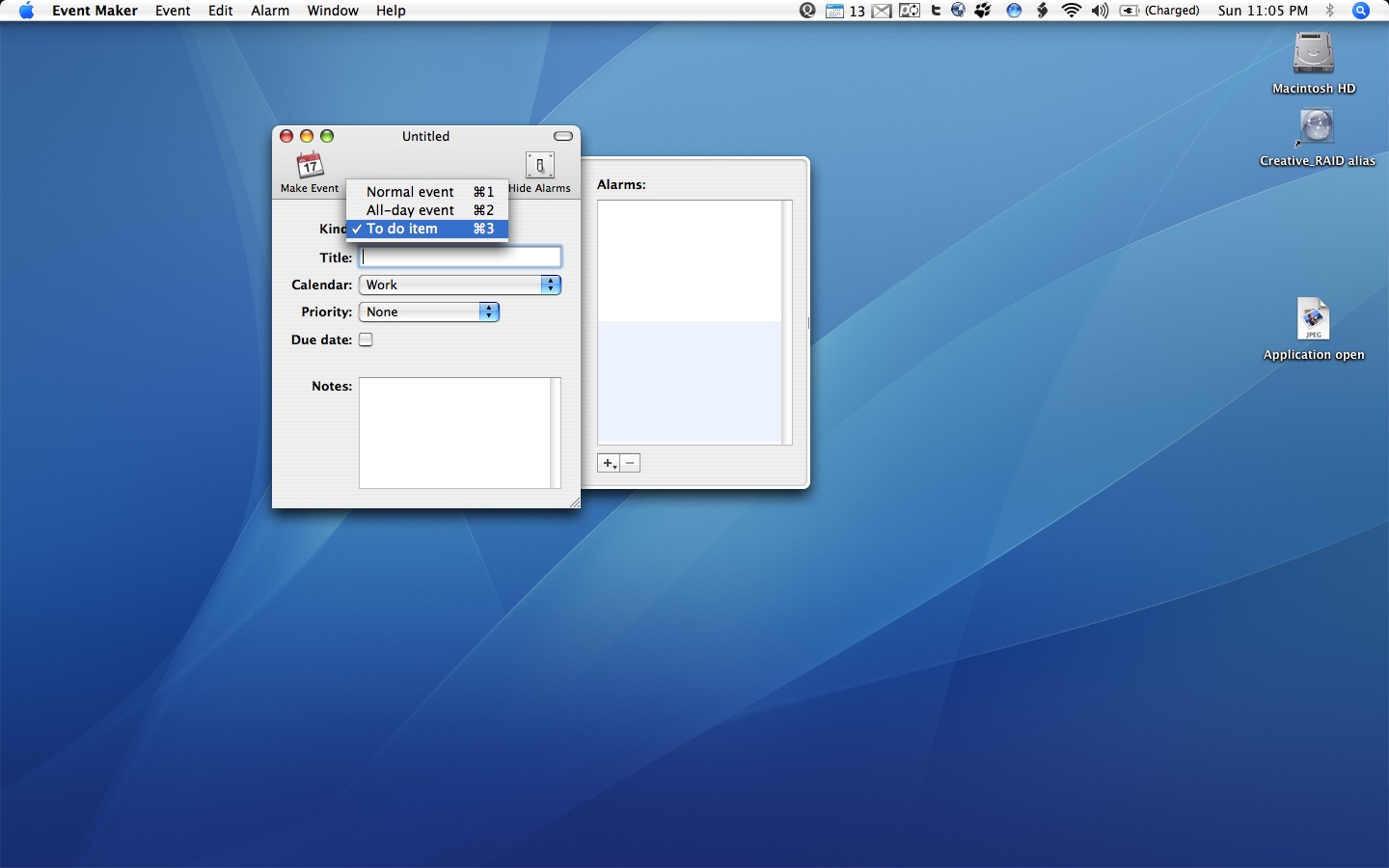
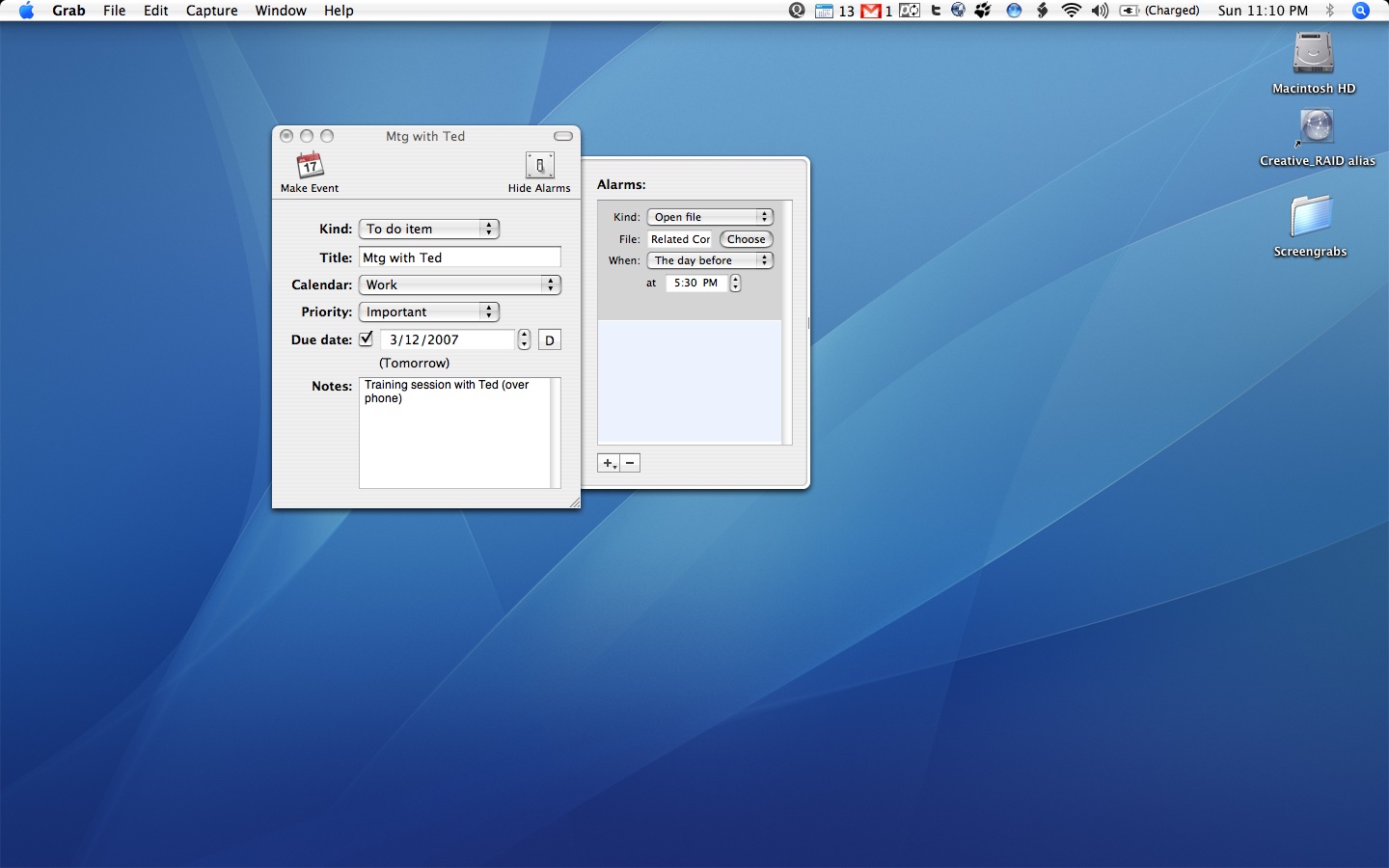
Event Maker 0.4 is an application that I use when I have to quickly create a new event, either from a phone call or an event from an email message (one that doesn’t include an invitation). Using a trigger that I created in Quicksilver, I’m able to call up Event Maker and fill in the fields. I know that there are ways of using the Quicksilver text “send to…” functionality, but I still haven’t mastered all that QS has to offer.
Event Maker makes it easy to compose and add to iCal both To Dos and Events in seconds. I have a tendency to use this less in creating Events/To Dos from my email as a recently added feature in MailTags allows me to do these right from my MTs pane. Still – this app is a great to have as part of my GTD process.
Mike Abdullah’s Event Maker is available from MacUpdate.
Below are screenshots of Event Maker in action:


Comments Off on Event Maker 0.4 – Quickly adds To Dos/Events to Calendars


 Setting Contexts
Comments Off on The New Kid on the Block – iGTD